
环境
CentOS6.5 x86_64位 采用最小化安装,系统经过了基本优化
selinux为关闭状态,iptables为无限制模式
源码包存放位置: /root
查看服务器内核是否支持inotify
[root@ client ~] # uname -r
2.6.32-431.el6.x86_64
[root@ client ~] # ll /proc/sys/fs/inotify/*
-rw-r--r-- 1 root root 0 Jun  4 15:30  /proc/sys/fs/inotify/max_queued_events
-rw-r--r-- 1 root root 0 Jun  4 15:30  /proc/sys/fs/inotify/max_user_instances
-rw-r--r-- 1 root root 0 Jun  4 15:30  /proc/sys/fs/inotify/max_user_watches
inotify 的默认内核参数详解
/proc/sys/fs/inotify/max_queued_events
     默认值: 16384
     该文件中的值为调用inotify_init时分配给inotify instance中可排队的event的数目的最大值,超出这个值得事件被丢弃,但会触发IN_Q_OVERFLOW事件
/proc/sys/fs/inotify/max_user_instances
     默认值: 128
     指定了每一个real user ID可创建的inotify instatnces的数量上限
/proc/sys/fs/inotify/max_user_watches
     默认值: 8192
     指定了每个inotify instance相关联的watches的上限,也就是每一个inotify实例可监控的最大目录数。如果监控的文件数目巨大,需要根据实际情况适当增加此值得大小。

注意:
     max_queued_events 是 Inotify 管理的队列的最大长度,文件系统变化越频繁,这个值就应该越大!如果你在日志中看到Event Queue Overflow,说明max_queued_events太小需要调整参数后再次使用
下载、解压、编译、安装
[root@ client ~] # wget http://nchc.dl.sourceforge.net/project/inotify-tools/inotify-tools/3.14/inotify-tools-3.13.tar.gz
[root@ client ~] # tar xzf inotify-tools-3.13.tar.gz
[root@ client ~] # cd inotify-tools-3.13
[root@ client inotify-tools-3.13] # ./configure
[root@ client inotify-tools-3.13] # make && make install
安装位置
[root@ client ~] # ll /usr/local/bin/inotify*
-rwxr-xr-x. 1 root root 38582 Jun  3 22:23  /usr/local/bin/inotifywait
-rwxr-xr-x. 1 root root 40353 Jun  3 22:23  /usr/local/bin/inotifywatch
inotifywait 仅执行阻塞,等待 inotify 事件,你可以使用它来监控任何一组文件和目录,或监控整个目录树(目录、子目录、子目录的子目录等等),并且可以结合 shell 脚本,更好的使用 inotifywait。
inotifywatch 用来收集关于被监视的文件系统的统计数据,包括每个 inotify 事件发生多少次。
使用语法
inotifywait [-hcmrq] [-e ] [-t ] [-- format ] [--timefmt ] [ ... ]选项参数:
-h,–help     # 输出帮助信息
@      # 排除不需要监视的文件,可以是相对路径,也可以是绝对路径
–fromfile    # 从文件读取需要监视的文件或排除的文件,一个文件一行,排除的文件以@开头
-m,–monitor  # 接收到一个事情而不退出,无限期地执行。默认行为是接收到一个事情后立即退出
-d,–daemon   # 跟–monitor一样,除了是在后台运行,需要指定 –outfile把事情输出到一个文件。也意味着使用了–syslog
-o,–outfile  # 输出事情到一个文件而不是标准输出。
-s,–syslog   # 输出错误信息到系统日志
-r,–recursive  # 监视一个目录下的所有子目录。
-q,–quiet    # 指定一次,不会输出详细信息,指定二次,除了致命错误,不会输出任何信息。
–exclude     # 正则匹配需要排除的文件,大小写敏感。
–excludei    # 正则匹配需要排除的文件,忽略大小写。
-t,–timeout # 设置超时时间,如果为0,则无限期地执行下去。
-e,–event    # 指定监视的事件。
-c,–csv      # 输出csv格式。
–timefmt     # 指定时间格式,用于–format选项中的%T格式。
– format      # 指定输出格式。
    %w 表示发生事件的目录
    %f 表示发生事件的文件
    %e 表示发生的事件
    %Xe 事件以“X”分隔
    %T 使用由–timefmt定义的时间格式
事件类型
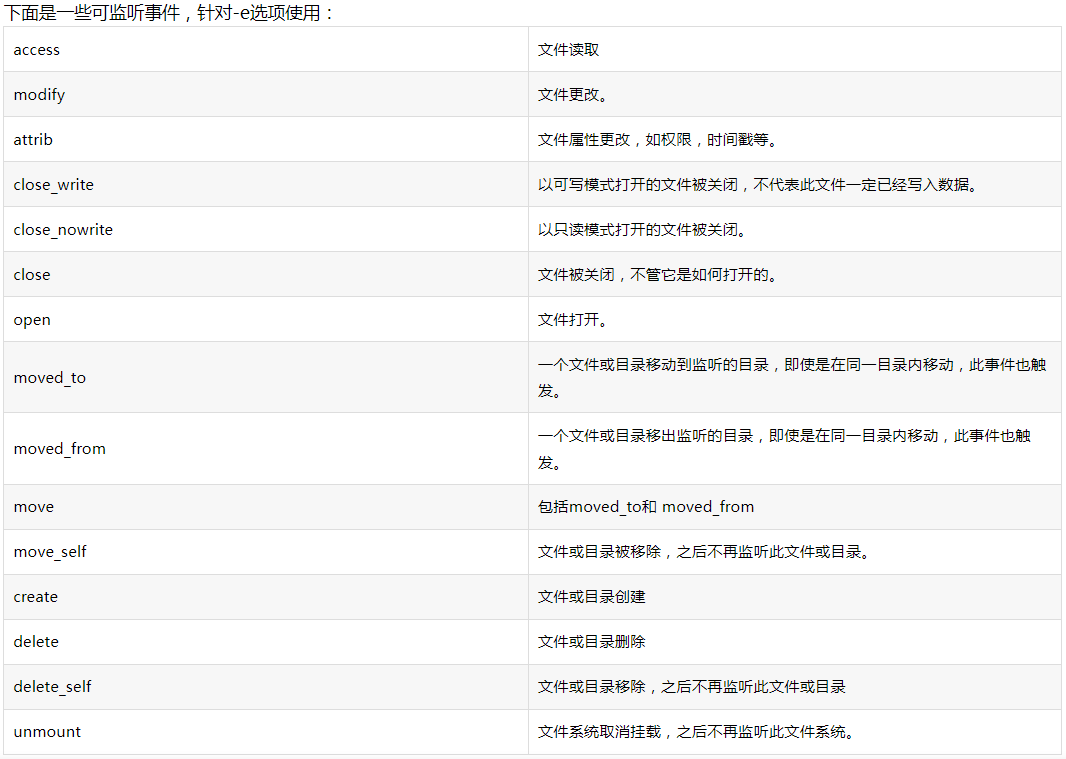
样例
#!/bin/bash
# Create by Shutao
# 实现对PID进程文件的监控,单应用重启时会刷新PID文件,进而触发监听事件。
# 脚本启动方式:nohup ./testMonitor.sh > /dev/null 2>&1 &
#######
inotifywait -m /usr/local/chyaitExam/server/PID.pid -e modify --format '%e' | while read event;
do
  curl 192.168.2.36:8085/hook/message/send?text=考试系统正在重启
  nohup ./listen8101.sh >/dev/null 2>&1 &
done
#!/bin/bash
# Create by Shutao
# 对yf-exam-api.jar文件进行监控,触发重启事件。
# 脚本启动方式:nohup ./MonitorJarAndStart.sh > /dev/null 2>&1 &
#######
inotifywait -m /usr/local/chyaitExam/server/yf-exam-api.jar -e close_write --format '%e' | while read event;
do
./start.sh
curl 192.168.2.36:8085/hook/message/send?text=考试系统节点二正在重启
done 赣公网安备36082502000158号