注:本文内容基于官方教程样例展开
目标
实现小球在平面上的运动,有反复弹跳的效果,有灯光阴影效果,并随弹跳高度变化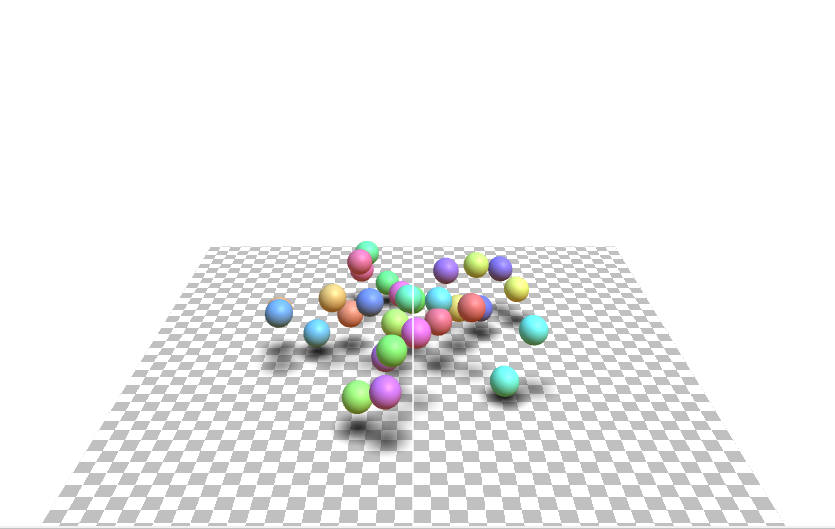
开始
1.创建基础容器
<!DOCTYPE html>
<html lang="en">
<head>
    <meta charset="UTF-8">
    <meta name="viewport" content="width=device-width, initial-scale=1.0">
    <title>3D小球</title>
</head>
<body>
<div id="controls" style="background-color: transparent;"></div>
<script src="../three.min.js"></script>
<script src="../common.js"></script>
</body>
</html>
2.初始化渲染器
    const renderer = new THREE.WebGLRenderer({antialias: true});
    renderer.setSize(window.innerWidth, window.innerHeight); // 设置渲染器宽高
3.创建画布
    const canvas = document.getElementById('controls');
    canvas.appendChild(renderer.domElement);
4.创建相机
    const fov = 60;
    const aspect = window.innerWidth / window.innerHeight;
    const near = 1;
    const far = 1000;
    const camera = new THREE.PerspectiveCamera(fov, aspect, near, far);
    camera.position.set(0, 20, 60);
5.创建场景
    const scene = new THREE.Scene();
    scene.background = new THREE.Color('#ffffff');
6.构建地面
    const loader = new THREE.TextureLoader();
    {
        const planeSize = 40;
        const texture = loader.load('https://threejs.org/manual/examples/resources/images/checker.png');
        texture.wrapS = THREE.RepeatWrapping;
        texture.wrapT = THREE.RepeatWrapping;
        texture.magFilter = THREE.NearestFilter;
        const repeats = planeSize / 2;
        texture.repeat.set(repeats, repeats);
        const planeGeo = new THREE.PlaneGeometry(planeSize, planeSize);
        const planeMat = new THREE.MeshBasicMaterial({
            map: texture,
            side: THREE.DoubleSide,
        });
        planeMat.color.setRGB(1.5, 1.5, 1.5);
        const mesh = new THREE.Mesh(planeGeo, planeMat);
        mesh.rotation.x = Math.PI * -.5;
        scene.add(mesh);
    }
7.构建主体小球与阴影
循环指定次数构建相应数量的小球,使用加载器加载的材质进行阴影构建。
    const shadowTexture = loader.load('https://threejs.org/manual/examples/resources/images/roundshadow.png');
    const sphereShadowBases = [];
    {
        const sphereRadius = 1;
        const sphereWidthDivisions = 32;
        const sphereHeightDivisions = 16;
        const sphereGeo = new THREE.SphereGeometry(sphereRadius, sphereWidthDivisions, sphereHeightDivisions);
        const planeSize = 1;
        const shadowGeo = new THREE.PlaneGeometry(planeSize, planeSize);
        const numSpheres = 30;
        for (let i = 0; i < numSpheres; ++i) {
            const base = new THREE.Object3D();
            scene.add(base);
            const shadowMat = new THREE.MeshBasicMaterial({
                map: shadowTexture,
                transparent: true, // so we can see the ground
                depthWrite: false, // so we don't have to sort
            });
            const shadowMesh = new THREE.Mesh(shadowGeo, shadowMat);
            shadowMesh.position.y = 0.001; // so we're above the ground slightly
            shadowMesh.rotation.x = Math.PI * -.5;
            const shadowSize = sphereRadius * 4;
            shadowMesh.scale.set(shadowSize, shadowSize, shadowSize);
            base.add(shadowMesh);

            const u = i / numSpheres;
            const sphereMat = new THREE.MeshPhongMaterial();
            sphereMat.color.setHSL(u, 1, .75);
            const sphereMesh = new THREE.Mesh(sphereGeo, sphereMat);
            sphereMesh.position.set(0, sphereRadius + 2, 0);
            base.add(sphereMesh);

            sphereShadowBases.push({base, sphereMesh, shadowMesh, y: sphereMesh.position.y});
        }

    }
8.创建环境光
{
    const skyColor = '#B1E1FF';
    const groundColor = "#B97A20";
    const intensity = 0.75;
    const light = new THREE.HemisphereLight(skyColor, groundColor, intensity);
    scene.add(light);
}
9.创建直射光源
{
    const color = '#FFFFFF';
    const intensity = 0.5;
    const light = new THREE.DirectionalLight(color, intensity);
    light.position.set(0, 10, 5);
    light.target.position.set(-5, 0, 0);
    scene.add(light);
    scene.add(light.target);
}
10.渲染器尺寸自适应
每帧动画都需要自适应渲染器尺寸大小
function resizeRendererToDisplaySize(renderer) {
    const canvas = renderer.domElement;
    const width = canvas.clientWidth;
    const height = canvas.clientHeight;
    const needResize = canvas.width !== width || canvas.height !== height;
    if (needResize) {
        renderer.setSize(width, height, false);
    }
    return needResize;
}
11.逐帧动画
    function render(time) {
        time *= 0.001;
        resizeRendererToDisplaySize(renderer);
        {
            const canvas = renderer.domElement;
            camera.aspect = canvas.clientWidth / canvas.clientHeight;
            camera.updateProjectionMatrix();
        }

        sphereShadowBases.forEach((sphereShadowBase, ndx) => {
            const {base, sphereMesh, shadowMesh, y} = sphereShadowBase;
            const u = ndx / sphereShadowBases.length;
            const speed = time * .2;
            const angle = speed + u * Math.PI * 2 * (ndx % 1 ? 1 : -1);
            const radius = Math.sin(speed - ndx) * 10;
            base.position.set(Math.cos(angle) * radius, 0, Math.sin(angle) * radius);
            const yOff = Math.abs(Math.sin(time * 2 + ndx));
            // 上下移动小球
            sphereMesh.position.y = y + THREE.MathUtils.lerp(-2, 2, yOff);
            // 阴影随小球上下移动渐变效果
            shadowMesh.material.opacity = THREE.MathUtils.lerp(1, .25, yOff);
        });
        renderer.render(scene, camera);
        requestAnimationFrame(render);
    }
    requestAnimationFrame(render);
12.添加交互
    addMouseDragging(renderer, scene)
    addMouseWheel(renderer, camera)
13.添加辅助线
为相机,场景,几何体,地面等添加辅助线,以帮助更好掌握视角光线等信息。
实现样例
本文完整代码
<!DOCTYPE html>
<html lang="en">
<head>
    <meta charset="UTF-8">
    <meta name="viewport" content="width=device-width, initial-scale=1.0">
    <title>3D小球</title>
</head>
<body>
<div id="controls" style="background-color: transparent;">

</div>
<script src="../three.min.js"></script>
<script src="../common.js"></script>
<script>

    const canvas = document.getElementById('controls');

    const renderer = new THREE.WebGLRenderer({antialias: true});
    renderer.setSize(window.innerWidth, window.innerHeight); // 设置渲染器宽高

    canvas.appendChild(renderer.domElement);

    const fov = 60;
    const aspect = window.innerWidth / window.innerHeight; // the canvas default
    const near = 1;
    const far = 1000;
    const camera = new THREE.PerspectiveCamera(fov, aspect, near, far);
    camera.position.set(0, 20, 60);
    // camera.lookAt(0, 0, 0);

    const scene = new THREE.Scene();
    // scene.background = new THREE.Color('white');
    scene.background = new THREE.Color('#ffffff');

    const helper = new THREE.CameraHelper(camera);
    scene.add(helper);

    const loader = new THREE.TextureLoader();

    {

        const planeSize = 40;

        const texture = loader.load('https://threejs.org/manual/examples/resources/images/checker.png');
        texture.wrapS = THREE.RepeatWrapping;
        texture.wrapT = THREE.RepeatWrapping;
        texture.magFilter = THREE.NearestFilter;
        // texture.colorSpace = THREE.SRGBColorSpace;
        const repeats = planeSize / 2;
        texture.repeat.set(repeats, repeats);

        const planeGeo = new THREE.PlaneGeometry(planeSize, planeSize);
        const planeMat = new THREE.MeshBasicMaterial({
            map: texture,
            side: THREE.DoubleSide,
        });
        planeMat.color.setRGB(1.5, 1.5, 1.5);
        const mesh = new THREE.Mesh(planeGeo, planeMat);
        mesh.rotation.x = Math.PI * -.5;
        scene.add(mesh);

    }

    const shadowTexture = loader.load('https://threejs.org/manual/examples/resources/images/roundshadow.png');
    const sphereShadowBases = [];
    {

        const sphereRadius = 1;
        const sphereWidthDivisions = 32;
        const sphereHeightDivisions = 16;
        const sphereGeo = new THREE.SphereGeometry(sphereRadius, sphereWidthDivisions, sphereHeightDivisions);

        const planeSize = 1;
        const shadowGeo = new THREE.PlaneGeometry(planeSize, planeSize);

        const numSpheres = 30;
        for (let i = 0; i < numSpheres; ++i) {

            // make a base for the shadow and the sphere.
            // so they move together.
            const base = new THREE.Object3D();
            scene.add(base);

            // add the shadow to the base
            // note: we make a new material for each sphere
            // so we can set that sphere's material transparency
            // separately.
            const shadowMat = new THREE.MeshBasicMaterial({
                map: shadowTexture,
                transparent: true, // so we can see the ground
                depthWrite: false, // so we don't have to sort
            });
            const shadowMesh = new THREE.Mesh(shadowGeo, shadowMat);
            shadowMesh.position.y = 0.001; // so we're above the ground slightly
            shadowMesh.rotation.x = Math.PI * -.5;
            const shadowSize = sphereRadius * 4;
            shadowMesh.scale.set(shadowSize, shadowSize, shadowSize);
            base.add(shadowMesh);

            // add the sphere to the base
            const u = i / numSpheres;
            const sphereMat = new THREE.MeshPhongMaterial();
            // sphereMat.color.setHSL(u, 1, .75);
            sphereMat.color.setHSL(u, 1, .75);
            const sphereMesh = new THREE.Mesh(sphereGeo, sphereMat);
            sphereMesh.position.set(0, sphereRadius + 2, 0);
            base.add(sphereMesh);

            // remember all 3 plus the y position
            sphereShadowBases.push({base, sphereMesh, shadowMesh, y: sphereMesh.position.y});

        }

    }

    {
        const skyColor = '#B1E1FF'; // light blue
        const groundColor = "#B97A20"; // brownish orange
        const intensity = 0.75;
        const light = new THREE.HemisphereLight(skyColor, groundColor, intensity);
        scene.add(light);
    }

    {
        const color = '#FFFFFF';
        const intensity = 0.5;
        const light = new THREE.DirectionalLight(color, intensity);
        light.position.set(0, 10, 5);
        light.target.position.set(-5, 0, 0);
        scene.add(light);
        scene.add(light.target);
    }

    function resizeRendererToDisplaySize(renderer) {

        const canvas = renderer.domElement;
        const width = canvas.clientWidth;
        const height = canvas.clientHeight;
        const needResize = canvas.width !== width || canvas.height !== height;
        if (needResize) {

            renderer.setSize(width, height, false);

        }

        return needResize;

    }

    function render(time) {

        time *= 0.001; // convert to seconds

        resizeRendererToDisplaySize(renderer);

        {

            const canvas = renderer.domElement;
            camera.aspect = canvas.clientWidth / canvas.clientHeight;
            camera.updateProjectionMatrix();

        }

        sphereShadowBases.forEach((sphereShadowBase, ndx) => {

            const {base, sphereMesh, shadowMesh, y} = sphereShadowBase;

            // u is a value that goes from 0 to 1 as we iterate the spheres
            const u = ndx / sphereShadowBases.length;

            // compute a position for there base. This will move
            // both the sphere and its shadow
            const speed = time * .2;
            const angle = speed + u * Math.PI * 2 * (ndx % 1 ? 1 : -1);
            const radius = Math.sin(speed - ndx) * 10;
            base.position.set(Math.cos(angle) * radius, 0, Math.sin(angle) * radius);

            // yOff is a value that goes from 0 to 1
            const yOff = Math.abs(Math.sin(time * 2 + ndx));
            // move the sphere up and down
            sphereMesh.position.y = y + THREE.MathUtils.lerp(-2, 2, yOff);
            // fade the shadow as the sphere goes up
            shadowMesh.material.opacity = THREE.MathUtils.lerp(1, .25, yOff);

        });

        renderer.render(scene, camera);

        requestAnimationFrame(render);
    }

    requestAnimationFrame(render);

    // 添加交互
    addMouseDragging(renderer, scene)
    addMouseWheel(renderer, camera)

</script>
</body>

</html>
作者:yuanfun 创建时间:2024-12-30 09:00
最后编辑:yuanfun 更新时间:2025-01-14 17:00
最后编辑:yuanfun 更新时间:2025-01-14 17:00